
Stuck with the “Compile error: Invalid outside procedure” when attempting to run a macro or perform a specific action within the Excel workbook? If so, do not worry, you are reading the correct webpage. This blog explains the common causes of this error and other vital information, along with the working solutions to solve it in a hassle-free manner.
Here’s the screenshot of the error:

Let’s read further…
To fix corrupt Excel file, we recommend this tool:
This software will prevent Excel workbook data such as BI data, financial reports & other analytical information from corruption and data loss. With this software you can rebuild corrupt Excel files and restore every single visual representation & dataset to its original, intact state in 3 easy steps:
- Try Excel File Repair Tool rated Excellent by Softpedia, Softonic & CNET.
- Select the corrupt Excel file (XLS, XLSX) & click Repair to initiate the repair process.
- Preview the repaired files and click Save File to save the files at desired location.
What Is Invalid Outside Procedure Error in Excel?
Invalid outside procedure Excel error is mainly occurring when trying to run a VBA code within a created library in Macro Workbook. When this error appears, it simply means that you have to declare all variables that you use denoting to an undeclared variable.
Why It Occurs?
Before moving ahead to fix this error message, it is vital to extract the major factors. Well, it occurs due to a wide variety of reasons, including:
- Corrupted Excel Workbook- The foremost reason for the occurrence of this warning message is a corrupted Excel file. It happens due to various causes, such as system crashes, sudden power outages, or malware infections.
- Incompatible Excel Version- Sometimes, incompatibility between the Excel version being used and the file format or macros in the spreadsheet.
- Faulty Add-ins or Macros- Incompatible or malfunctioning add-ins within Excel lead to various issues, including “invalid outside procedure” error VBA Excel.
Workarounds to Fix Invalid Outside Procedure Excel Error
After identifying the common reasons, it is now quite simple to tackle the situation. All you need to do is to follow the workarounds below workarounds and solve it effortlessly.
Workaround 1- Repair Corrupted MS Excel Workbook
As already mentioned in the causes, this warning message can also trigger due to Excel file corruption. In such a situation, it is worth trying the Open and Repair feature of Microsoft Excel to repair your corrupt Excel file.
Here is the complete steps to run this tool:
- Open Excel software >> go to the File tab >> click Open.
- Choose Browse to select the faulty file.
- In the opened dialog box, select the corrupted file.
- After this, click on the arrow next to the Open button >> Tap Open and Repair.
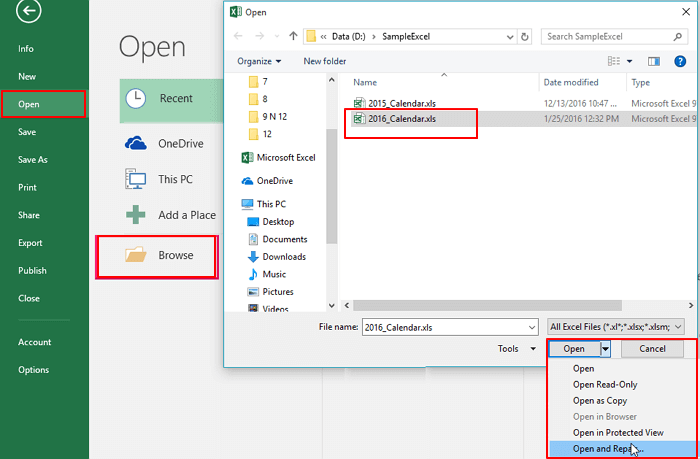
- Finally, click on the Repair button to recover as much of the workbook data as possible >> click Close.

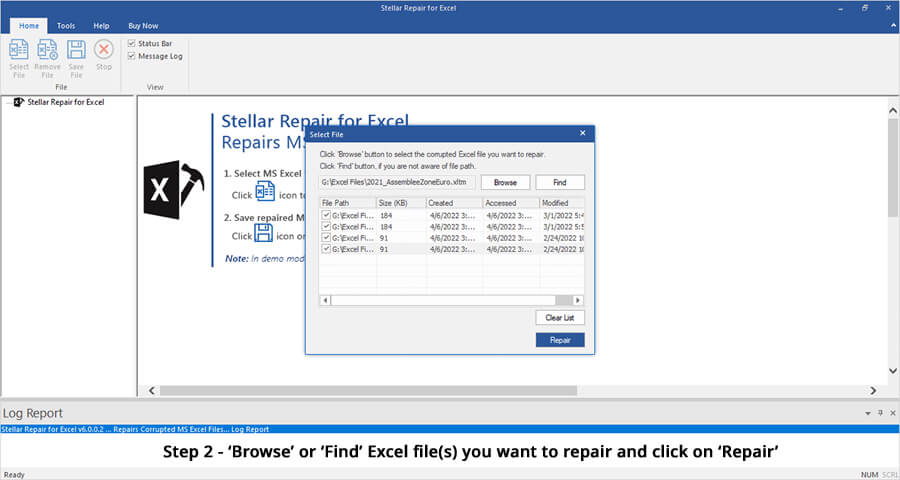
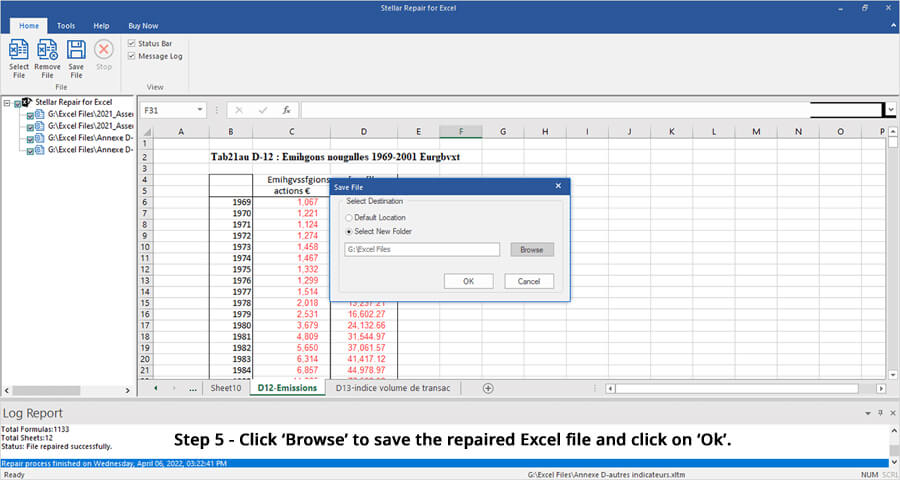
If the Open and Repair utility fails to work, it means your Excel file is severely corrupted. Using an urbane Excel Repair Tool, you can fix a severely corrupt Excel workbook and recover all its components with 100% integrity.
Steps to Utilize the Excel Recovery Tool:





Also Read: Fixing Compile Error in Hidden Module Excel- 9 Pro Tips Revealed!
Workaround 2- Check for Missing Reference
Since the compile error is associated with the macro so, it is vital to check for the missing references and deal with the error.
To do this, follow the steps below:
- Open the Excel application >> press ALT +F11 keys on a keyboard.
- Under an opened VBA window, you have to click on Tools >> References dialog box.
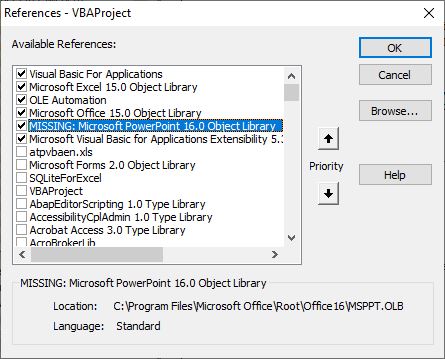
- Select the missing reference >> start your Object Browser.
- Now, use a Browse dialog box to search for missing references.
- Click OK and check for the problem.
Workaround 3- Fix Invalid Outside Procedure Excel Error by Updating Excel Software
Running an outdated version of Excel software is another possible solution to fix this error message. Simply follow the below instructions carefully to update the Excel version:
- Open the Microsoft Excel application.
- Next, click File menu >> Account option.
- After this, go to the Update Options >> Update Now.
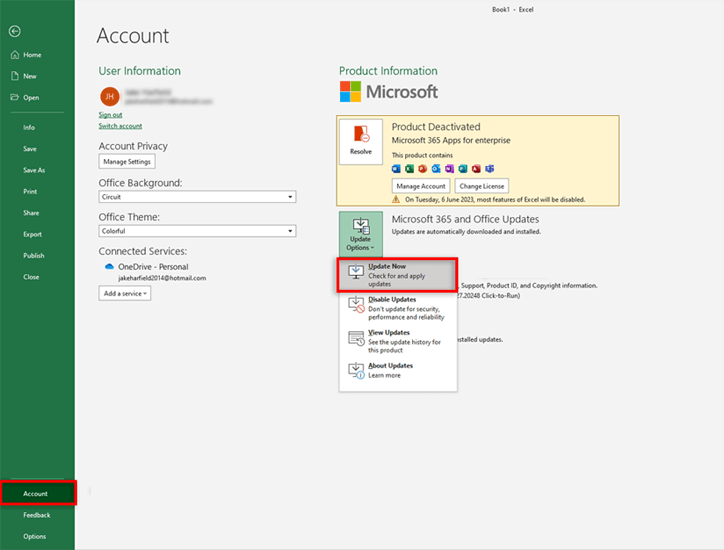
- Now, reboot your system.
Workaround 4- Disable Faulty Add-ins
Adding amply of add-ins to the Excel program can also trigger compile errors, usually due to corrupted ones. However, disabling such faulty add-ins can fix compile error invalid outside procedure in Excel effectively.
Follow these steps to do this:
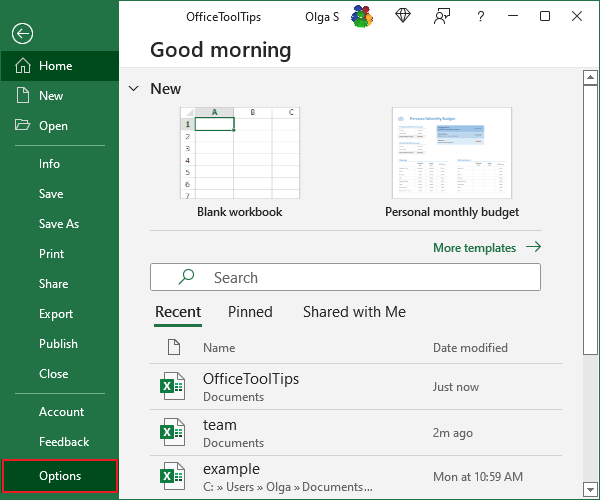
- Open Excel sheet> click File menu > Options.
- Now, click on Add-ins under the Excel options > choose Excel add-ins > click Go.
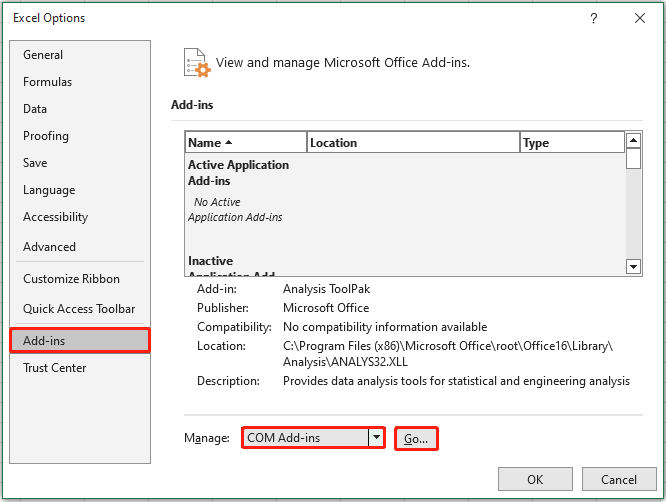
- After this, simply uncheck all boxes there and click OK.

If this method fails, proceed to try the next one.
Workaround 5- Try Other Resolutions
Apart from the above resolutions, try some other fixes like:
Hope this works for you.
Unique FAQs:
This compile error means that you have to declare all variables that you use denoting to an undeclared variable.
Yes, with the help of a third-party Excel Recovery Tool, you can recover data from a corrupted Excel file.
A compile-time error in Microsoft Excel generally refers to the bugs that resemble to the semantics or syntax.
Yes, by updating the Excel version regularly and creating the Excel file backup, you can decrease the likelihood of getting this error.
To fix an invalid name error in Excel, you have to correct the typo in the syntax & retry the formula.
If none of the above-specified methods work, then consider seeking help from Excel experts, they will surely provide additional solutions. What Does Compile Error Invalid Outside Procedure Mean?
Is There a Way to Recover Corrupted Excel File Data?
What Type of Error Is a Compile-Time Error?
Can I Prevent Compile Error Invalid Outside Procedure in Excel from Occurring?
How Do I Fix an Invalid Name Error in Excel?
What Should I Do If None of The Specified Methods Work?
Also Read: Excel “Compile Error: Can’t Find Project or Library” Error
Time to Conclude
Microsoft Visual Basic compile error invalid outside procedure is common in Excel VBA. However, fixing it involves basic structural checks. Above, I have explained a few working fixes to troubleshoot this error in no time. Follow these steps for error-free Excel automation.
I hope you liked this post!

Priyanka Sahu

Priyanka is a content marketing expert. She writes tech blogs and has expertise in MS Office, Excel, and other tech subjects. Her distinctive art of presenting tech information in the easy-to-understand language is very impressive. When not writing, she loves unplanned travels.